Getting Started with FxCanvas
FxCanvas is a high-performance canvas encoding library that allows you to programmatically create images by building a sequence of drawing operations. Unlike traditional canvas APIs, FxCanvas encodes your drawing commands into a compact binary format that can be rendered server-side via API calls.
Installation
npm install fxcanvasBasic Usage
import { Canvas, Color } from 'fxcanvas';

// Create a new canvas encoder with dimensions
const canvas = new Canvas(400, 200);

// Set up styles
canvas.setFillStyle(new Color(255, 0, 0)); // Red
canvas.setStrokeStyle(new Color(0, 0, 255)); // Blue
canvas.setLineWidth(2);

// Draw shapes
canvas.fillRect(50, 50, 100, 100);
canvas.strokeRect(200, 50, 100, 100);

// Generate the render request
const request = canvas.getRequest({
  token: 'your-api-token',
  format: CanvasImageFormat.Png,
  quality: 90
});

// Send to rendering service
fetch(request);
Core Concepts
High-level Architecture
FxCanvas works by encoding commands in a bytecode buffer, which is then sent to our server via an HTTP requests. The upside of doing this is that your systems remain free from any rendering overhead — no node-canvas, no skia, no cairo, etc. In exchange, you won't be able to access intermediate state, because all canvas calls are encoded ahead-of-time, and all execution is deferred. This may seem limiting, but you would be suprised about how much you can do with such simple primitives.
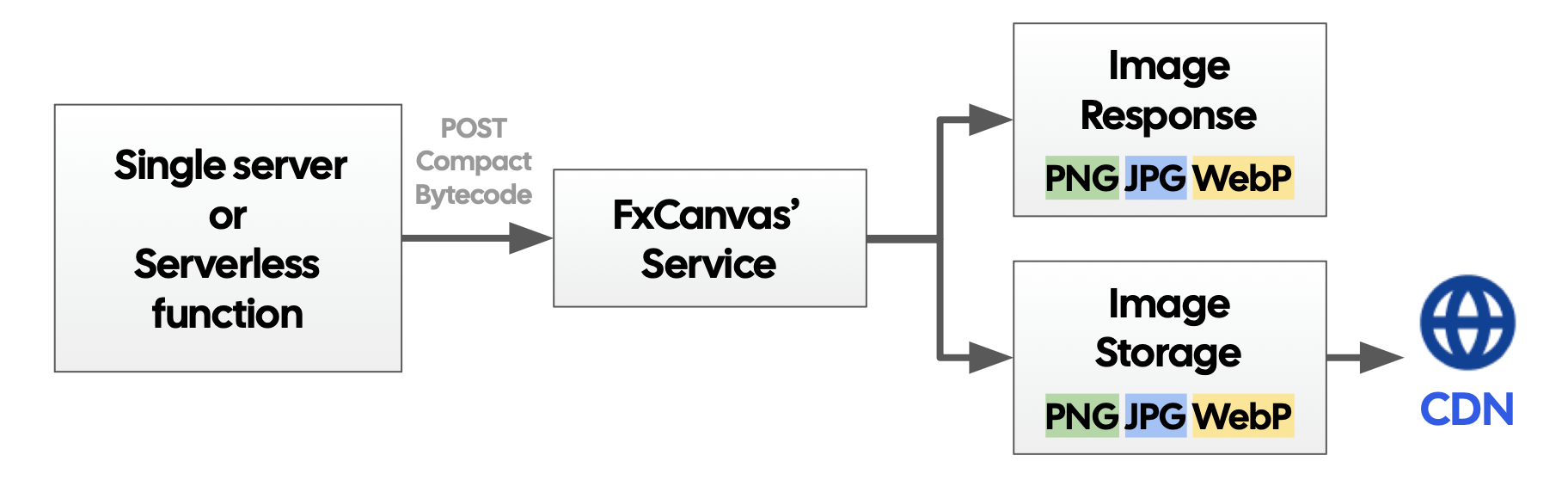
By design, FxCanvas aims to provide a request object instance of sorts, for you (the user) to send using whatever HTTP client you desire. This means that all FxCanvas SDKs are free from side effects, and are only concerned with encoding commands into the bytecode.
Canvas
The main class that records all drawing operations. It maintains state for styles, transformations, and builds the binary encoding. This is equivalent to the web's CanvasRenderingContext2D.
Colors, Gradients, and Patterns
FxCanvas uses dedicated classes for styling:
Colorfor solid colors (supports named colors, RGB, HSV, hex)LinearGradient/RadialGradientfor smooth color transitionsPatternfor tiled textures
Fonts and Text
Text rendering uses FontFace objects for custom fonts and Font descriptors for styling.
Images
Images are loaded via the Image class and drawn with drawImage().
Extensions
Specialized contexts for QR codes (QRContext) and AI-generated images (Txt2ImgContext).
Rendering Workflow
- Create Encoder: Initialize
CanvasEncoderwith dimensions - Build Operations: Call drawing methods to encode operations
- Generate Request: Use
getRequest()to create an API request - Render: Send the request to get the final image
Next Steps
- Drawing Shapes - Learn about basic shape operations
- Working with Colors - Color system and styling
- Text and Fonts - Typography and font management